
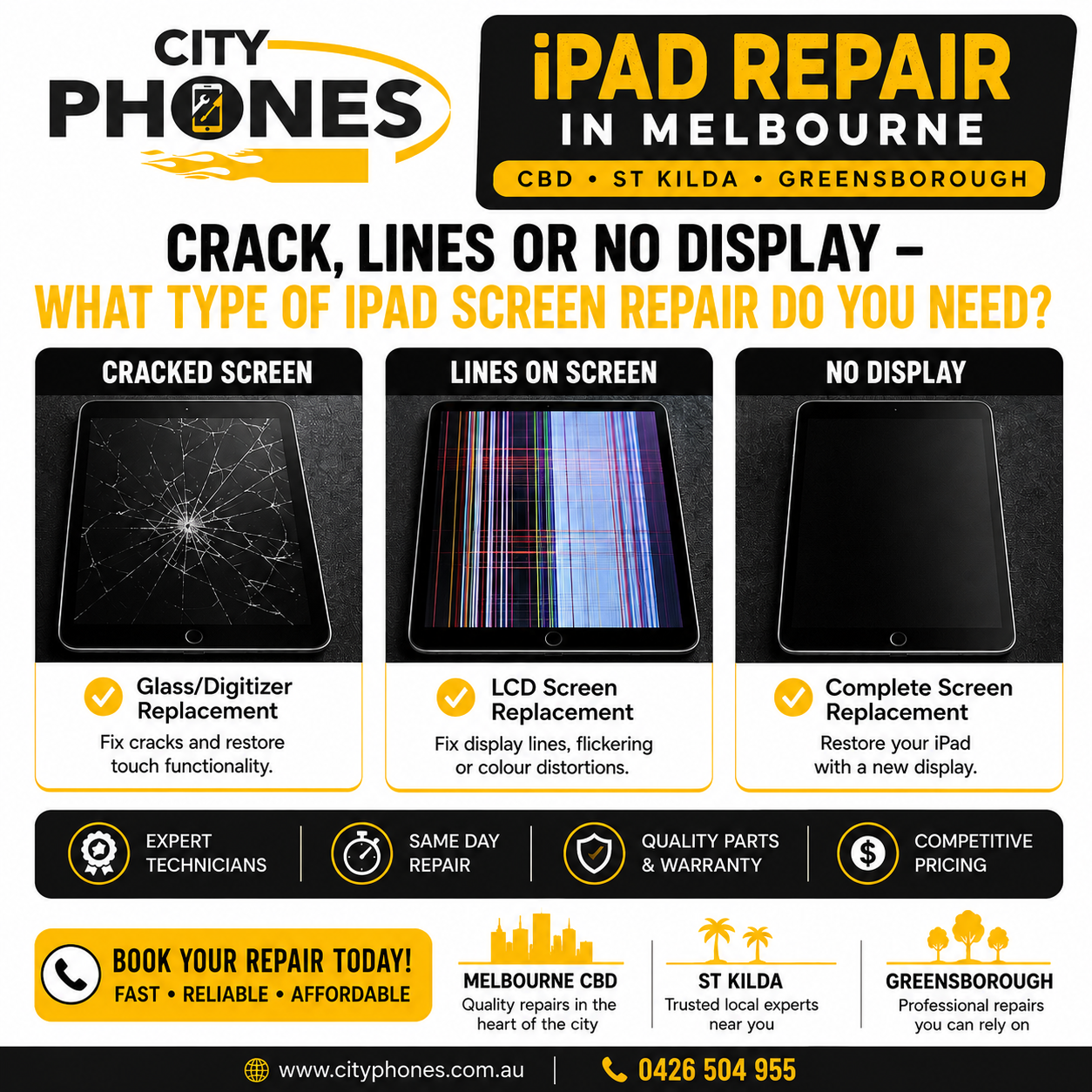
iPad repair in Melbourne CBD, St Kilda and Greensborough: crack, lines or no display – what type of iPad screen repair do you need?
When your iPad hits the floor, the damage isn’t always as simple as “screen broken”. Sometimes you only crack the front glass, sometimes you see coloured lines or black spots, and sometimes the display goes completely black. Each of these symptoms points to a different type of iPad screen repair and a different price range.
In this guide, we’ll explain how an iPad screen is built, how to tell the difference between glass damage and LCD damage, and how City Phones approaches iPad repair in Melbourne CBD, St Kilda and Greensborough so you don’t pay for more than you actually need.
iPad screen basics: glass, touch and LCD
An iPad “screen” is actually a stack of layers that work together:
- Front glass: The hard outer layer you see and touch, designed to protect the display.
- Touch layer (digitiser): Sits just under the glass and detects your taps and swipes.
- LCD / display panel: The layer underneath that shows the actual image – apps, photos and videos.
On many older iPads, the glass/digitiser and LCD are separate parts, which sometimes allows glass‑only repairs, while newer laminated displays combine these parts into one bonded module. Knowing which type you have helps explain why some repairs are cheaper and others require a full screen assembly.
When a crack is “just” a cracked front glass
If your iPad has visible cracks but the picture looks normal, you might only have damage to the glass and touch layer. Typical signs include:
- Cracked or shattered glass, but no coloured lines or dark “ink” patches under the surface
- Screen still shows a clear image at normal brightness
- Touch works accurately everywhere on the display
On non‑laminated models (for example, many older standard iPads and some early minis), technicians can sometimes replace just the front glass/digitiser while reusing the original LCD. This is often cheaper than full LCD replacement and keeps the original display quality, though it’s still a delicate job best left to experienced repair shops.
When cracks cause deeper LCD damage
In a hard drop, the broken front glass can also damage the LCD underneath. That’s when you’ll see:
- Dark “inky” splodges that spread out from a crack
- Big areas of the screen that are black or discoloured
- Multiple colours blooming under the glass
Guides explain that this happens when shards of glass or impact force puncture or crush the LCD layer, not just the surface. In these cases, a glass‑only repair won’t fix the problem – you need a full LCD (screen assembly) replacement.
Lines across the screen: classic LCD failure
If your iPad shows:
- Vertical or horizontal coloured lines
- Flickering stripes
- Sections of the display that don’t refresh properly
…that almost always indicates a damaged LCD or display connection rather than a simple glass issue. Repair guides and technicians confirm that when you see persistent lines, the solution is to replace the LCD assembly, even if the front glass is still intact.
These issues can appear after a drop, pressure on the screen, or even sometimes on well‑cared‑for devices as components age, but they are still hardware faults – not software bugs – so an update or reset will not repair them.

No display at all: black screen but iPad still on
Another common situation is when the iPad:
- Stays black even after charging
- Makes sounds or vibrates
- Shows up in iTunes/Finder or on a connected computer
Here, the logic board may still be running but the display/backlight has failed. Causes include severe LCD damage, backlight circuit faults or cable issues after an impact. Again, the fix is usually a full display assembly replacement and sometimes extra work if the backlight circuitry is damaged.
How City Phones diagnoses your iPad screen damage
City Phones is an independent repair company that handles mobile phones, tablets, laptops and smartwatches using genuine‑quality parts and a standard repair warranty. With locations in Melbourne CBD, St Kilda and Greensborough, they provide convenient access for customers across Melbourne who need iPad repairs.
When you bring in your iPad, a technician will typically:
- Inspect the glass and frame – Looking for cracks, bends and signs of impact or pressure.
- Test the display – Checking for lines, spots, flicker, dim areas or total black screen.
- Check touch response – Ensuring taps and swipes register across the whole display.
- Discuss repair options – Explaining whether glass‑only is possible for that model or if a complete LCD assembly is required, along with pricing and estimated turnaround time.
This quick assessment helps match the repair type (glass vs LCD) with the damage you actually have, so you’re not over‑paying or under‑repairing.
iPad repair in Melbourne CBD, St Kilda and Greensborough: what to expect
Because City Phones operates multiple stores, your experience is similar no matter which you visit:
- Melbourne CBD: Ideal if you work or study in the city and want to drop your iPad off during the day.
- St Kilda: Convenient for bayside and inner‑south suburbs needing iPad screen repair closer to home.
- Greensborough Plaza: Easy option for customers in Melbourne’s north‑east, with shopping centre parking and longer trading hours on some days.
For many iPad models, screen repairs can be completed within hours depending on parts availability and workload, with all locations following the same repair standards and warranty policies.
When is iPad screen repair worth it?
Whether you’re in the CBD, St Kilda or Greensborough, it usually makes sense to repair your iPad screen if:
- The device is less than about five years old and still fast enough for your apps
- Damage is limited to the screen (glass or LCD) and maybe the battery
- The repair cost is clearly lower than replacing the iPad with a similar‑spec new model
On the other hand, if your iPad has multiple major issues – severe board damage, very old hardware and a very high screen repair cost – it can be worth discussing alternatives with the technician. City Phones can help you weigh up the numbers before you decide.
Final thoughts
The symptoms you see on your iPad – simple cracks, coloured lines or a completely black screen are strong clues about which type of repair you actually need: glass‑only or full LCD replacement. Understanding this difference helps you ask the right questions and avoid paying for the wrong repair.
If you’re unsure what that crack, line or blank display really means, dropping into City Phones in Melbourne CBD, St Kilda or Greensborough for a quick assessment is the easiest way to get a clear answer and an accurate quote to bring your iPad back to life.








Leave a Reply