
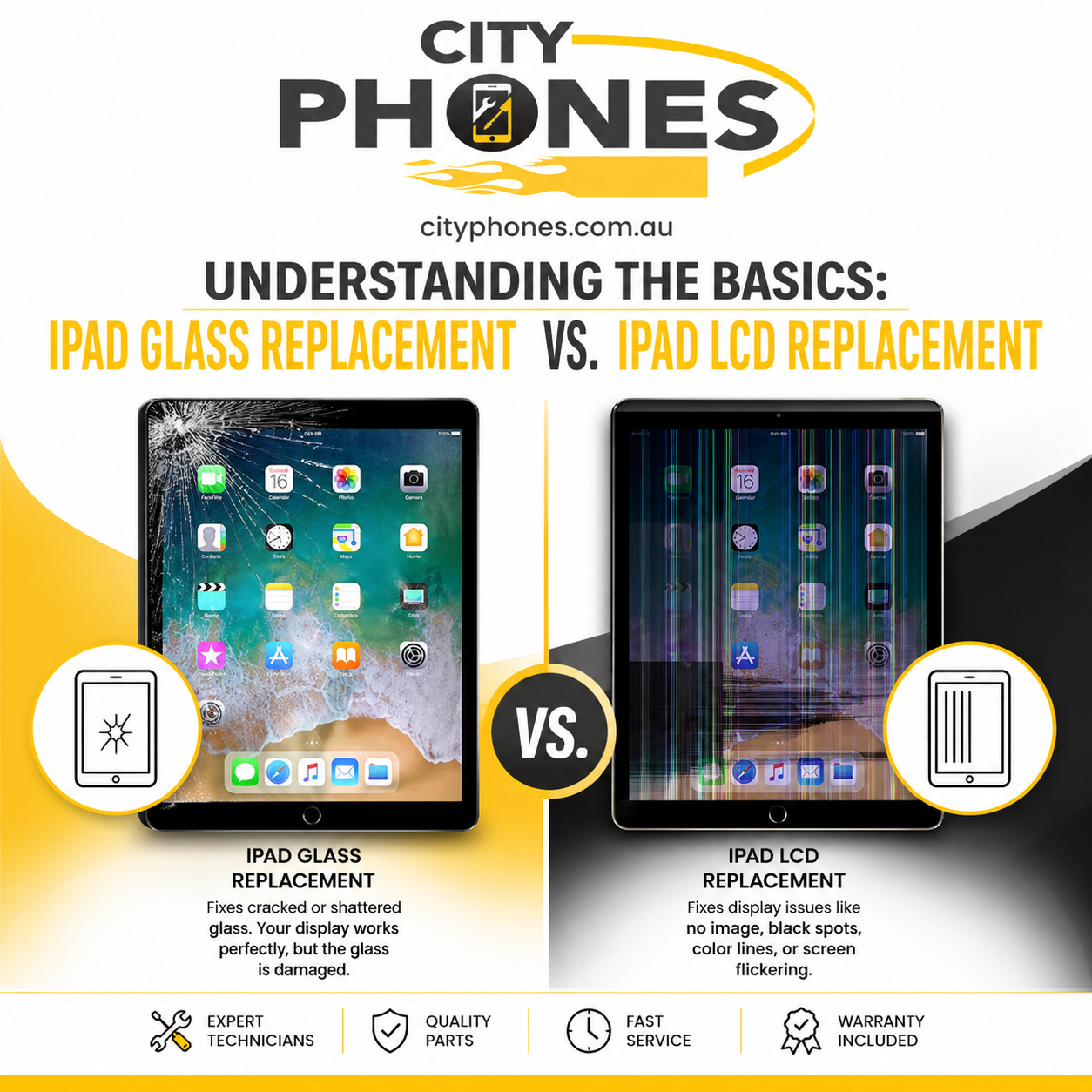
Understanding the basics: iPad glass replacement vs. iPad LCD replacement
Seeing cracks on your iPad screen is stressful, but it doesn’t always mean the whole display needs to be replaced. In many cases, only the top glass layer is damaged, while the image underneath is still perfectly fine.
In this post, we’ll explain the basic parts of an iPad screen, the difference between glass replacement and LCD replacement, and how to recognise which kind of repair your iPad is likely to need.
iPad screen basics: glass, digitiser and LCD
An iPad screen is actually a “sandwich” of several layers:
- Front glass: The hard outer layer you touch and see. Its main job is protection.
- Digitiser: A thin layer under the glass that detects your touch and passes signals to the iPad’s brain.
- LCD (display): The panel underneath that shows the picture – apps, photos, videos and text.
On some older iPads, the glass/digitiser and LCD are separate parts, while many newer models use a laminated display where everything is fused together. This difference is important because it affects whether a “glass‑only” repair is possible.
What is iPad glass replacement?
Glass replacement (often called “glass‑only” or “digitiser” replacement) is when only the cracked outer glass and digitiser are changed, while the LCD panel is reused. This is usually an option when:
- The glass is cracked or shattered
- The picture underneath still looks normal (no lines, black spots or colour issues)
- Touch works smoothly across the whole screen
Guides note that on non‑laminated models such as older standard iPads (6th, 7th, 8th, 9th gen) and early iPad mini models, the glass and LCD are separate, so replacing just the front glass can restore the look of the iPad at a lower cost than a full module.
However, separating and rebonding glass from the LCD is a delicate job that usually requires professional tools and experience, so it’s not recommended as a DIY project.
Signs your iPad likely needs only glass replacement
You might be looking at a glass‑only repair if:
- The screen is visibly cracked, but the image is clear and bright
- There are no coloured lines, dark patches or “ink” marks under the glass
- The touchscreen responds normally everywhere you tap and swipe
In other words, the damage is cosmetic (glass) but hasn’t reached the display or touch electronics underneath. Even then, technicians will usually inspect the device closely to make sure there’s no hidden LCD or touch damage before confirming glass‑only repair.

What is iPad LCD replacement?
LCD replacement means swapping out the full display assembly, including the LCD, and often the glass and digitiser together – especially on laminated iPads where these parts are fused. This is a more involved repair and typically costs more, but it’s the only real fix when the display itself is damaged.
Technicians and repair guides say you need LCD replacement if there’s any imperfection in the picture, including lines, black “ink” spots, heavy discolouration or no image at all.
Signs your iPad needs LCD replacement
Common signs of a damaged iPad LCD include:
- Coloured or black lines running across the screen (vertical or horizontal)
- Dark or “ink‑like” blotches that look like liquid under the glass
- Big areas of discoloration or strange colour patches
- Flickering or ghosting, where old images seem to “stick” on the screen
- Very dim or completely black display, even though the iPad turns on or makes sounds
- Touch not working properly together with the visual issues above
If you see any of these, replacing just the glass will not fix the problem the underlying LCD (and often the touch layer) must be replaced.
Why some iPads only get full screen replacement
Many recent iPads, including iPad Pro and some Air and standard models, use laminated displays, where the glass, digitiser and LCD are bonded as one unit. In these cases, even if the damage looks like “just a crack”, authorised and most independent repair centres replace the whole display assembly because separating the layers safely isn’t practical.
That’s why you’ll often see only a single “screen replacement” price for newer iPads, while older models might list different pricing for glass‑only vs LCD replacement.
How choosing the right repair saves money
Understanding the difference between glass and LCD replacement helps you avoid overpaying or under‑repairing:
- If you only need glass, a glass‑only repair (where possible) is normally cheaper than replacing the full display.
- If the LCD is damaged but you choose a glass‑only option, the display problems will remain and you’ll pay twice.
Professional technicians will assess your iPad, test the touch response, and inspect the display for lines, spots and backlight issues before advising which type of repair actually makes sense.
A quick checklist before you book a repair
Before you bring your iPad in, run through this simple checklist:
- Look closely at the picture – Any lines, spots, flickering or weird colours? If yes, you’re likely in LCD territory.
- Test touch everywhere Try typing, dragging icons and scrolling across the whole screen. Any dead zones or random touches? That can indicate deeper damage.
- Check brightness If the display is very dim or black but you still hear sounds or feel vibration, the LCD or backlight system probably needs replacing.
Take notes or photos of what you see – this can help the repair shop quickly understand the issue.
How City Phones fits in
City Phones is a Melbourne‑based repair shop specialising in iPhone, Samsung, Google Pixel and iPad repairs. Including screen replacement services as well. Their technicians work with both older and newer iPad models. And can advise whether your device is a good candidate for glass‑only replacement or needs a full display.
If you’re unsure what kind of damage you’re dealing with, bringing the iPad in for a quick assessment. It is often the easiest way to get a clear answer. and to get a realistic quote before you decide how to proceed.
Final thoughts
The key difference between iPad glass replacement and iPad LCD replacement is what’s actually damaged: cosmetic glass on top, the display underneath, or both. Cracks with a perfect image and responsive touch may only need glass, while lines, blotches, flicker or a black screen point to deeper LCD issues and a full screen swap.
Knowing these basics makes it easier to talk confidently with a repair technician, understand your options and avoid spending more than you need to get your iPad looking and working like new again.








Leave a Reply