
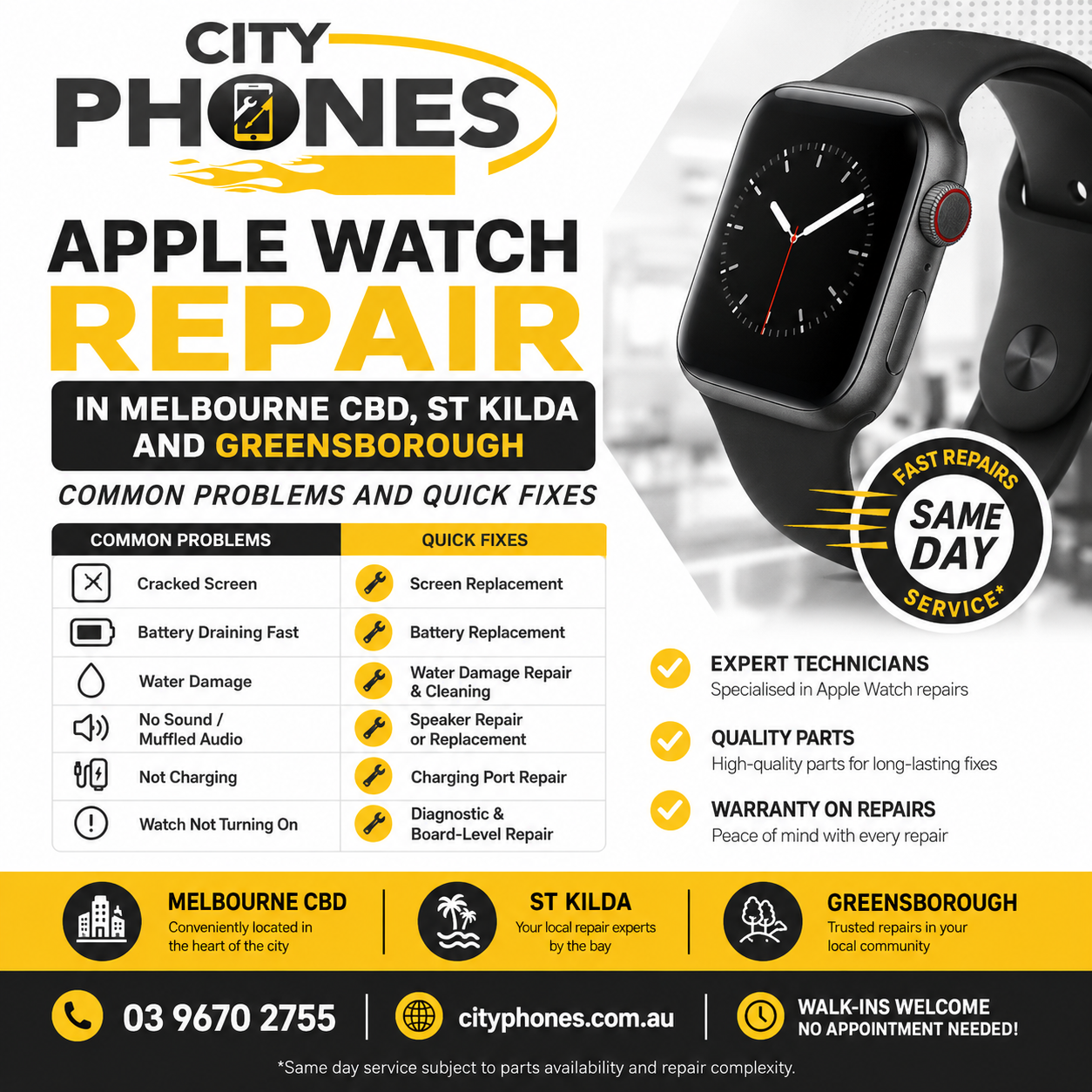
Apple Watch repair in Melbourne CBD, St Kilda and Greensborough: common problems and quick fixes
Apple Watch has become more than a simple timepiece – it tracks your health, handles notifications and even lets you pay without pulling out your phone. When it cracks, stops holding charge or refuses to turn on, it can throw off your whole day.
This guide explains the most common Apple Watch problems, simple checks you can try yourself, and when it’s time to book an Apple Watch repair in Melbourne CBD, St Kilda or Greensborough with City Phones.
How City Phones helps with Apple Watch repair
City Phones is an independent repair company that now offers dedicated Apple Watch repair in Melbourne CBD, from Series 1 through to the latest models. Their technicians repair smart devices every day including iPhones, iPads and Apple Watches – and are equipped to handle:
- Apple Watch screen and glass repair
- LCD / display replacement
- Touch issues and fault diagnosis
- Apple Watch battery replacement
- Water‑damage assessment and repair
With repair locations in Melbourne CBD, St Kilda and Greensborough, you can choose whichever store is easiest to reach for a walk‑in or booked appointment.
Problem 1: Cracked or shattered Apple Watch screen
What it looks like
Apple Watch screens are exposed all day, so bumps on door frames, gym equipment or tiles are very common. Typical symptoms:
- Cracked or spider‑webbed front glass
- Touch not responding properly, or only in some areas
- Black spots or coloured lines under the glass
Guides and repair centres note that if the display still shows a clear image and responds to touch, the damage may be limited to the glass and touch layer; if you see black patches or lines, the underlying OLED/LCD is likely damaged as well.
Quick checks you can try
- Press the Digital Crown and swipe around the screen. If touch is accurate everywhere and the picture is perfect, it may be glass‑only damage.
- If parts of the display are blacked out or show coloured lines, or if touch fails in those areas, you’re looking at full screen/LCD replacement.
Apple’s own support site confirms that accidental screen damage is usually a paid repair, not covered by standard warranty. City Phones can replace the cracked screen or full display assembly, then re‑seal the watch and test all functions the same day for many models.
Problem 2: Apple Watch battery draining too fast
What it looks like
Battery complaints are among the most common Apple Watch issues. Signs your battery may be due for replacement include:
- Battery dropping from high percentages to very low in a few hours
- Watch shutting down unexpectedly, even with charge showing
- Watch getting unusually hot while charging
Quick checks you can try
Apple suggests a few software steps before replacing hardware:
- Check Battery Health in Settings → Battery → Battery Health on your watch. Very low “Maximum Capacity” indicates wear.
- Turn on Low Power Mode and disable features you don’t use often (always‑on display, some background apps, constant cellular use).
- Keep the watch on Bluetooth with your iPhone nearby where possible; constant cellular use in poor‑signal areas consumes more power.
If the battery still doesn’t last a full day after these tweaks and your watch is more than a couple of years old, a professional Apple Watch battery replacement is usually the best long‑term fix. City Phones can test the battery first, then swap it and re‑test the watch before returning it to you.
Problem 3: Buttons, Digital Crown or touch not responding
What it looks like
Sweat, dust and everyday grime can build up around the Digital Crown and side button, making them feel sticky or unresponsive. Touch issues can also appear after minor impacts.
Quick checks you can try
Apple recommends:
- Holding the watch under lightly running fresh water (if your model supports it) and rotating the Digital Crown to help flush out debris, then drying with a lint‑free cloth.
- Restarting both your iPhone and Apple Watch, and checking for watchOS updates.
If the crown or button still doesn’t click or scroll smoothly, or if touch remains unreliable after cleaning and updates, the internal flex cables or switches may be worn or damaged. At that stage, a technician needs to open the watch for proper diagnosis and repair.
Problem 4: Water and impact damage
What it looks like
Apple Watch has water‑resistance ratings, but Apple also warns that soaps, hot water, chemicals and repeated impacts can weaken seals over time. Symptoms of water or impact damage include:
- Screen flickering or going black after a swim or shower
- Speaker sounding very quiet or distorted
- Random restarts or failure to power on
What to do (and what not to do)
- Turn the watch off and remove it from the charger.
- Don’t heat it with a hairdryer or put it in rice – these can make corrosion worse.
- Let it air dry, then bring it to a repair centre as soon as you can.
Specialists can open the watch, inspect for corrosion, clean affected areas and replace damaged components where possible. Quick action often makes the difference between a successful repair and a watch that’s too corroded to save.
Is Apple Watch repair worth it?
Articles comparing Apple Watch repair vs replacement generally agree that repair is often the smarter choice when:
- Only the screen is cracked but the watch still works normally
- Battery life has dropped, but the watch is otherwise fine
- The Digital Crown, buttons or specific functions have failed, but the watch still powers on
Typical repair costs (screen, battery or button work) can be significantly lower than the price of a new Apple Watch, especially for recent models. Replacement becomes more sensible when:
- There is severe board‑level water damage and the watch won’t turn on at all
- Several major issues (screen + battery + sensors) are present on an older model
City Phones can help you weigh repair cost against the watch’s age and your usage before you commit.
How Apple Watch repair works at City Phones
Across Melbourne CBD, St Kilda and Greensborough, the repair process is broadly the same:
- Diagnosis
- Technician inspects the screen, casing and sensors
- Runs basic tests for touch, buttons, speaker, mic and connectivity
- Clear quote
- You get a price and expected turnaround time before any work starts.
- Repair
- Screen, LCD, battery or other components are replaced as needed
- Watch is re‑sealed and assembled carefully
- Testing and handover
- All functions are checked again – display, touch, buttons, heart‑rate sensor, connectivity before the watch is returned
- Repairs are backed by a standard warranty on parts and labour
You can walk in, book online, or in many cases use City Phones’ mail‑in repair options if you prefer not to travel.
Final thoughts
A cracked Apple Watch screen, tired battery or sticky Digital Crown doesn’t automatically mean you need to buy a new watch. In many cases, Apple Watch repair in Melbourne CBD, St Kilda or Greensborough screen, LCD, battery or button work can get your watch back to normal at a fraction of replacement cost.
By understanding the main Apple Watch issues and how specialist repair centres like City Phones handle them, you can make a confident decision, keep your favourite watch on your wrist and avoid unnecessary e‑waste and expense.




Leave a Reply